

n this post, I will explain how to install and configure Apache 2.4 with MariaDB 10.11 and PHP 8.4 to improve the execution performance of our code. PHP-FPM interprets the PHP code only once, then reuses the cached version stored in memory.
What is PHP-FPM?
FPM (FastCGI Process Manager) is an alternative implementation of PHP FastCGI with additional features useful for high-traffic websites. Some of its capabilities include:
- Advanced process management for easy start/stop handling
- Ability to start process threads with different user IDs, group IDs, chroot environments, and php.ini configurations
- Emergency restart in case of accidental cache destruction
- Support for accelerated uploads
- Slow log for tracking unusually slow script executions
- Special function
fastcgi_finish_request()for stopping and flushing data while continuing long processes - Dynamic/static thread creation
Installation Steps
Installing MariaDB 10.11
MariaDB is an open-source database management system derived from MySQL. To install it, run:
sudo apt-get install apt-transport-https curl

sudo mkdir -p /etc/apt/keyrings

sudo curl -o /etc/apt/keyrings/mariadb-keyring.pgp 'https://mariadb.org/mariadb_release_signing_key.pgp'

sudo apt update

sudo apt install mariadb-server mariadb-backup

mysql_secure_installation
Installing Apache 2.4
To install the latest available version of Apache on Ubuntu 18.04:
apt -y install apache2 libapache2-mod-fcgid
apache2ctl configtest
nano /etc/apache2/apache2.conf
ServerName MyServer
Installing PHP 8.4 as PHP-FPM
To install PHP 8, enable the repository:
apt install -y software-properties-common

add-apt-repository ppa:ondrej/php

apt install -y php8.4-fpm libapache2-mod-fcgid
Configuring PHP-FPM Settings
Edit the php.ini file:
nano /etc/php/8.4/fpm/php.iniModify the following values:
file_uploads = On
allow_url_fopen = On
memory_limit = 512M
upload_max_filesize = 200M
post_max_size = 200M
max_execution_time = 360
max_input_time = 360
date.timezone = America/La_Paz
Configuring Apache to Use PHP-FPM
Enable necessary modules:
a2enmod proxy_fcgi setenvif

a2enconf php8.4-fpm
Edit the virtual host configuration:
nano /etc/apache2/sites-available/000-default.confAdd:
<VirtualHost *:80>
    ServerAdmin webmaster@localhost
    DocumentRoot /var/www/html
    ErrorLog ${APACHE_LOG_DIR}/error.log
    CustomLog ${APACHE_LOG_DIR}/access.log combined

    <FilesMatch "\.php$">
        SetHandler "proxy:unix:/run/php/php8.4-fpm.sock|fcgi://localhost/"
    </FilesMatch>
</VirtualHost>
Restart Apache:
systemctl restart apache2.serviceTesting the Configuration
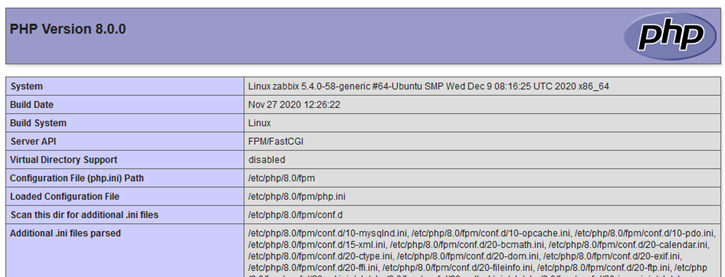
Create a test PHP file:
sh
nano /var/www/html/info.phpAdd:
php
<?php phpinfo(); ?>
Access the file via your browser:
References:
- Instalación, configuración de Apache 2.4 con MariaDB 10.11 y PHP 8.4
- PHP: FastCGI Process Manager (FPM) – Manual
Discover more from Blog personal de Guido Cutipa
Subscribe to get the latest posts sent to your email.